Support
Tips for getting the most out of CannaBaseAI, and how to reach us if something isn’t working.
Contact
Email paul@paulorized.com for bug reports, account help, or anything else. Please include your username and a brief description of what you were trying to do, and a screenshot if relevant.
How to scan
The AI extracts product details from photos of cannabis labels. Clearer photos in better light produce better extractions. Take multiple shots of the same product to capture every angle of the label — the more photos you give it, the more fields the AI can fill in.
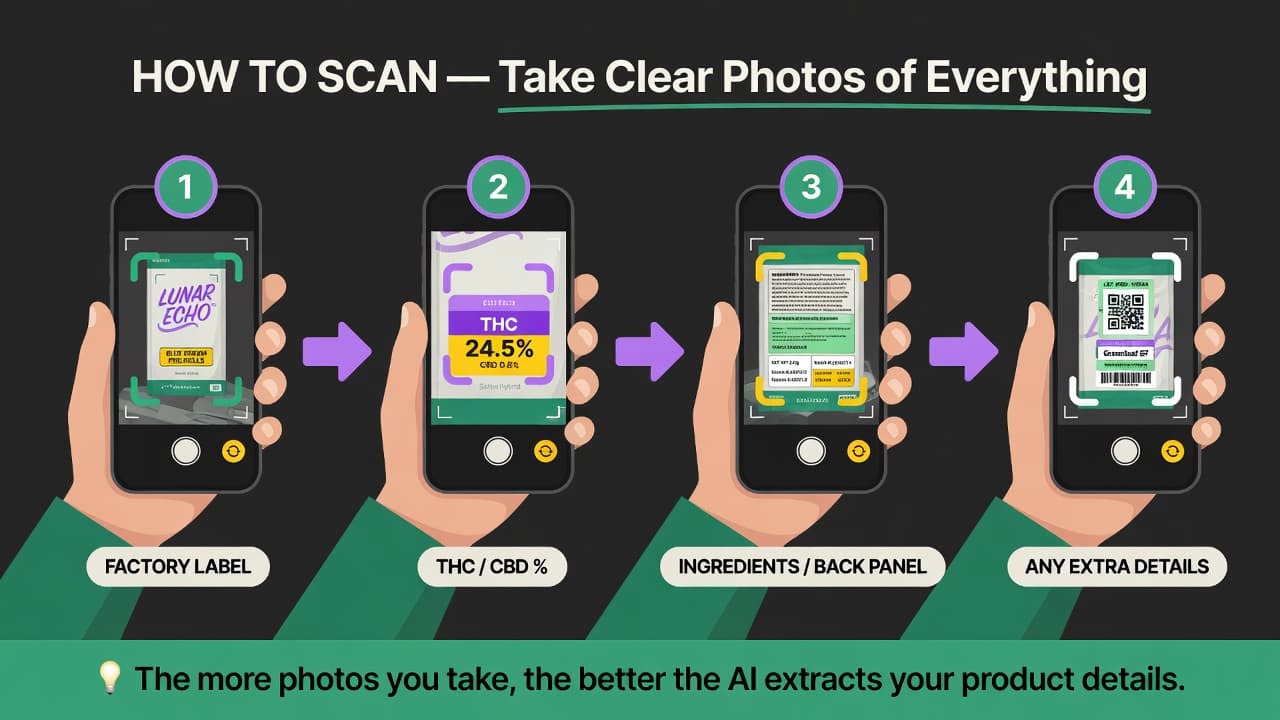
- Factory label. Capture the front of the package with the brand name and strain.
- THC / CBD %. If the potency is printed on a separate sticker or panel, snap it separately so the numbers come through clearly.
- Ingredients / back panel. The back panel often has terpene profiles, batch dates, and lab references the AI can use to enrich your scan.
- Any extra details. Lab QR codes, COA stickers, or weight stamps. The scanner reads QR codes automatically when present.
Frequently asked
- My scan returned blank fields. The label may have been blurry, glare-affected, or partially cropped. Try retaking the shot in better light, or use the manual entry option to fill in the fields directly.
- My scan history isn’t showing on a new device. iCloud sync runs through your Apple ID. Make sure both devices are signed in to the same Apple ID and that iCloud is enabled for CannaBaseAI in Settings → Apple ID → iCloud → Apps Using iCloud.
- I’d like to delete my account. Open Settings inside the app, scroll to the Danger Zone section, and tap Delete account. This permanently removes your scans, reviews, comments, and votes.
- Where do I find the privacy policy and terms? From inside the app: gear icon → Settings → Legal. On the web: Privacy Policy and Terms of Service.